## Cambium Data Blog
Cambium Data has been serving the Omaha area since 2009, providing IT Support such as technical helpdesk support, computer support, and consulting to small and medium-sized businesses.
[ Categories ](https://cambiumdata.directivesites.com/blog/categories "Categories")
[ Tags ](https://cambiumdata.directivesites.com/blog/tags "Tags")
[ Categories: All Categories ](https://cambiumdata.directivesites.com/javascript:void(0); "Categories")
Search...Suggested keywords
[ x ](https://cambiumdata.directivesites.com/javascript:void(0);)
# Tip of the Week: How to Use Excel to Create QR Codes
[Cambium Data Blog](https://cambiumdata.directivesites.com/blog/categories/blog) [Tip of the Week](https://cambiumdata.directivesites.com/blog/categories/tip-of-the-week)
[Tony Underwood](https://cambiumdata.directivesites.com/blog/blogger/tony-underwood)
Friday, 14 March 2025
[ 0 Comments ](https://cambiumdata.directivesites.com/blog/tip-of-the-week-how-to-use-excel-to-create-qr-codes#comments)
[  ](//cambiumdata.directivesites.com/images/easyblog_shared/March_2025/03-14-24/CreateQRCode_40664374_400.jpg "Tip of the Week: How to Use Excel to Create QR Codes")
QR codes are a popular way to direct individuals to specific web pages, like your business’ website. You can make them with relative ease, so there’s no excuse not to use them. Today, we’ll go over how you can make them in Microsoft Excel, a tool your business already probably uses to some extent.
## Start By Building a Table
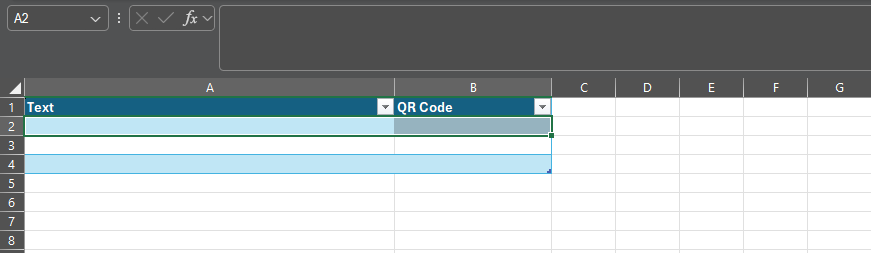
Your first step is to build a table in Excel. Use the Insert menu to find the option for Table. Make one with two columns, then rename Column1 as Text and Column2 as QR Code.
Your end result should look like this:
## Populate Your Table with Links
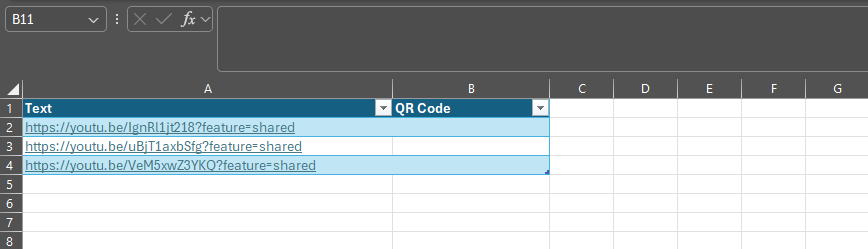
Under the Text column, place your links; these are the destinations for your QR codes.
## Add a Formula
Once you’re ready, select the top empty space in the QR Code column. You’ll then paste the following into the formula tab:
=IMAGE("https://api.qrserver.com/v1/create-qr-code/?size=150x150&data="&\[@Text\]&"")

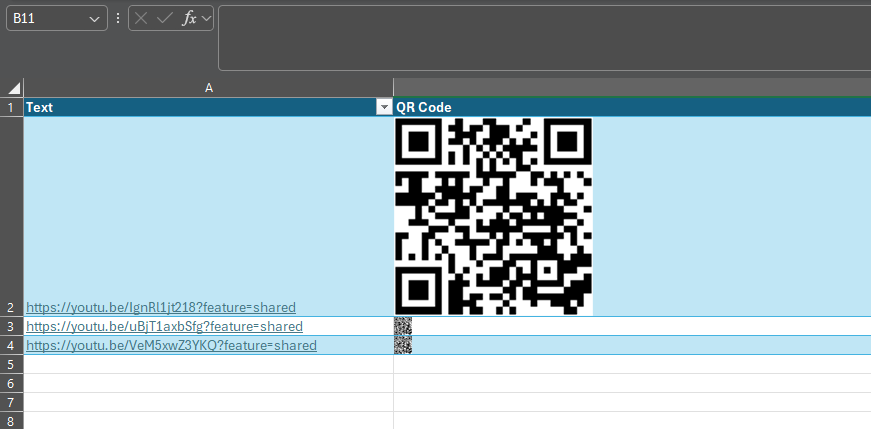
## Look, You Have a QR Code!
In the column, you should see QR codes for each of the links in the appropriate cell. We’ve edited our screenshot to show you a bit more clearly what’s going on, but all codes will direct to the corresponding link. You can copy them from this spreadsheet and use them anywhere you’d like.
### Pretty Simple, Right?
If you found this blog helpful, consider giving us a call at (402) 514-3200 to see how we can help your business make better use of the tools it already has at its disposal.
[ ](https://cambiumdata.directivesites.com/javascript:void(0);) [ ](https://cambiumdata.directivesites.com/javascript:void(0);) [ ](https://cambiumdata.directivesites.com/javascript:void(0);)
Tags:
[Quick Tips](https://cambiumdata.directivesites.com/blog/tags/quick-tips) [Efficiency](https://cambiumdata.directivesites.com/blog/tags/efficiency) [Tip of the Week](https://cambiumdata.directivesites.com/blog/tags/tip-of-the-week)
[ How Backup Has Gotten Better and Better in Recent ... ](https://cambiumdata.directivesites.com/blog/how-backup-has-gotten-better-and-better-in-recent-years)
[ How to Share Your Screen in Meet, Teams, and Zoom ](https://cambiumdata.directivesites.com/blog/how-to-share-your-screen-in-meet-teams-and-zoom)
About the author
[  ](https://cambiumdata.directivesites.com/blog/blogger/tony-underwood)
[Tony Underwood](https://cambiumdata.directivesites.com/blog/blogger/tony-underwood)
[ ](https://cambiumdata.directivesites.com/blog/blogger/tony-underwood)
Tony Underwood, Founder and President of Cambium Data Inc. has proven himself as one of the top internetworking experts in the industry. Mr. Underwood began his IT career in 1991 in the US Navy working on critical military computer systems. He grew his computer and networking knowledge through a number of different IT jobs from desktop support all the way up to leading the Network Engineering organization of a multi-billion dollar international company. Mr Underwood was recognized as Cisco Certified Internetwork Expert [\#7112](https://connect.directive.com/v4_6_release/services/system_io/Service/fv_sr100_request.rails?service_recid=7112&companyName=Dti) in March of 2001 and in 2022 he achieved the lifetime status of Cisco CCIE Emeritus
Author's recent posts
[More posts from author](https://cambiumdata.directivesites.com/blog/blogger/tony-underwood)
[ Friday, 04 September 2026 How Modern IT Management Mitigates Zero-Day Threats ](https://cambiumdata.directivesites.com/blog/how-modern-it-management-mitigates-zero-day-threats)
[ Thursday, 03 September 2026 Cambium Data launches new website! ](https://cambiumdata.directivesites.com/news-a-events/launches-new-website)
[ Wednesday, 02 September 2026 How to Avoid the 4 Common Backup Failures ](https://cambiumdata.directivesites.com/blog/how-to-avoid-the-4-common-backup-failures)
Comments
No comments made yet. Be the first to submit a comment
**** Already Registered? [Login Here](https://cambiumdata.directivesites.com/home/login-logout?return=aHR0cHM6Ly9jYW1iaXVtZGF0YS5kaXJlY3RpdmVzaXRlcy5jb20vYmxvZy90aXAtb2YtdGhlLXdlZWstaG93LXRvLXVzZS1leGNlbC10by1jcmVhdGUtcXItY29kZXM=)
Friday, 04 September 2026
Subscribe to the blog (Please fill in your email address to subscribe to updates from this post.)
**Captcha Image**